FEATURES
Your PDFs, filled and signed online.
Stop printing, scanning, and emailing paperwork. GetSecureForms handles the whole trip from blank form to signed copy.
AI-assisted setup
Upload a fillable PDF and AI turns cryptic field names into clear questions. Mark each one required, optional, or ignored before sending.
Private signing links
Each signer gets a unique, unguessable link — no account needed — with optional password protection.
Draw or type a signature
Signers draw with a mouse or finger, or pick a cursive style. Every page is stamped with signer, date, time, and IP address.
Contacts
Everyone you send a form to is saved as a contact, so the next request is one click away.
Your form library
Upload, rename, edit questions, and organize the forms your business sends most.
Office-only approval
Sections marked for office use are completed by your team after the signer finishes.
Supporting documents
Signers can attach licenses or other files, stored privately with the completed form.
Time-limited copies
Choose how long a signer can view their password-protected signed copy.
30-day trash
Deleted forms wait 30 days before they're gone, with a clear warning before permanent removal.
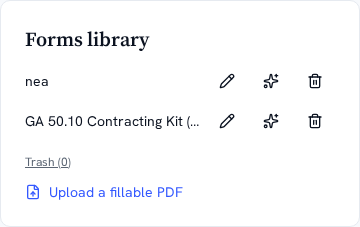
The form library
Every form your business uses, ready to send.
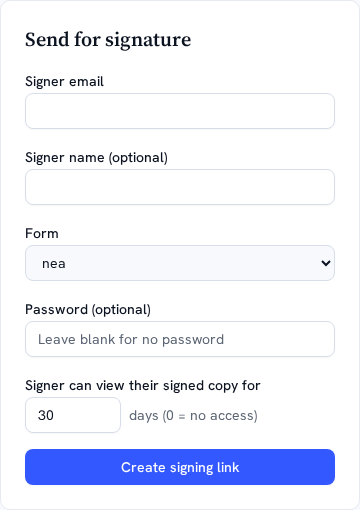
Sending a form
Pick a contact, add a password, set copy access.